
Meeting reminder for Mac · Free
Never late to a meeting again.
A countdown in your menu bar. At fifteen seconds, the whole screen. One button: Join.
macOS 14 or later · No account
The problem
The 10-minute reminder, minute by minute.
10:04
A reminder ten minutes early
is a reminder to forget.

#product
Re: Re: Re: Q4 numbers 9:55
to you, finance, 6 others
docs / pricing / v7-final-FINAL
weekly sync link
No results in Mail, Chat or Drive
Weekly Product Sync · meeting chat
Sorry, joining now
You · 10:04Swiped away.
Just one quick reply.
Okay, one more.
14 tabs.
Wait, where’s the link?
Four minutes late.
How it works
One meeting, start to finish.
Fifty seconds, narrated, from the first reminder to what you decided.
Dictation is recognised on your Mac. The meeting itself is never recorded.
The panel
Your whole day, on a dial.
What’s next, when you’re free, and when to leave.
- Meetings left, free time leftAnd your longest free stretch, at the top.
- The day on a dialThe knob sits at now: what’s on, or how long you’re free.
- Clashes, spelled outTwo meetings at once are bracketed in orange, with the overlap.
- Join from the listThe next call rises with a Join button ten minutes before.
The knob has eyes. They’re watching your cursor.

Around the meeting
Before, during and after.
Everything around the call, on the Mac you’re already using.

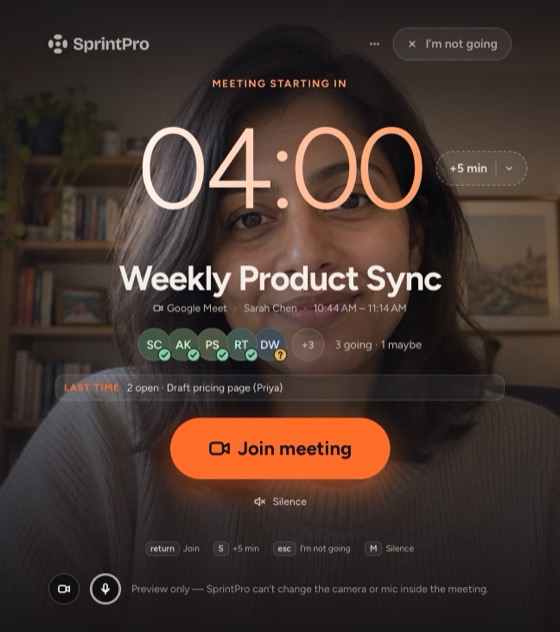


You set the rules
As loud as you need. No louder.
- Calm
- Notification at 10 minutes, banner at 15 seconds.
- Balanced
- The default. Notification at 15 minutes, banners at 5 and 1 with sound.
- Hard to miss
- Banner at 1 minute, whole screen at 15 seconds, and again 2 minutes in if you haven’t joined.
Or build your own, per calendar, with your own sound.
Privacy
The whole architecture.
Your calendar talks to your Mac. That’s it.
- 0
- accounts
- 0
- servers of ours
- 0
- in-app analytics
Connect Google to send invitations, and SprintPro talks to Google Calendar straight from your Mac. Camera and mic only while the alert is open, never recorded. Read the privacy policy.
Works with what you have
Your calendars. Your meeting apps.
Whatever your Mac already syncs. A link it doesn’t know still joins.
Zoom Google Meet Microsoft Teams Webex Slack FaceTime and 43 more
Be on time for the next one.
Your next :30 is in 11:24. Plenty of time to install it. Free on the Mac App Store. Installs in seconds.
Mac App Store · macOS 14 or later
FAQ
Questions, answered.
What is SprintPro?
A free Mac menu bar app that reminds you of meetings. Reminders build from a notification to a banner to, if you want, the whole screen. Each has a Join button for Zoom, Meet, Teams and 46 more.
How is it different from Calendar’s own alerts?
Calendar’s alerts all look and sound the same. SprintPro counts down in the menu bar, gets louder near the start, and joins in one click. To get more from Calendar alone, see Meeting reminders on a Mac that you won’t miss.
Is it really free?
Yes. Every feature, no trial, no account.
Which Macs does it run on?
macOS 14 Sonoma or later, Apple silicon or Intel.
Which calendars?
Any your Mac syncs: Google, iCloud, Exchange and more.
Will it change my calendar?
Only when you ask: a new meeting, a move, a reply.
What does it do with my Google account?
Nothing, unless you connect one in Settings › Calendars to send invitations. Then SprintPro uses Google Calendar to show your meetings, create them with a Meet link, see when guests are free, and move or reply to meetings when you ask. It all goes straight between your Mac and Google. Disconnect revokes access. How SprintPro uses Google data.
Is there a Windows or iPhone version?
No. Mac only.
How do I remove it?
Quit it from the ··· menu and drag it to the Bin.